

Time tracking + invoicing
Time tracking with invoicing built in
A time tracker with invoicing saves you from copying hours into a separate billing tool. In WorkHours you pick a period and the app builds a PDF invoice from the hours you already tracked: regular hours and overtime at their own rates, tax and total due calculated, and a day-by-day timesheet attached so the client can check every line.
At a glance
- Invoice and timesheet in one PDF, or a timesheet on its own
- Regular and overtime hours on separate lines and rates
- Tax rate, issue date, due date and notes per invoice
- Draft preview first, then issue to number the invoice
- Built from the same sessions you tracked with the timer
From hours to invoice, step by step
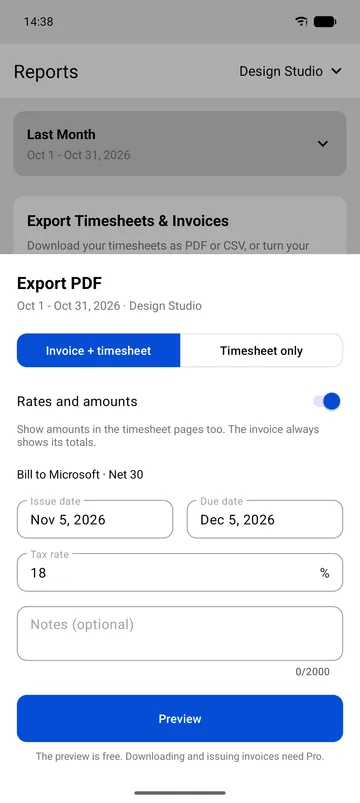
Every invoice setting on one sheet
Open Reports, choose the period and tap Export PDF. Select Invoice + timesheet, or Timesheet only when an employer just needs the hours.
Keep “Rates and amounts” on to show money in the timesheet pages too. The client comes from the job, and you set the issue date, due date, tax rate and an optional note.
- Invoice + timesheet or Timesheet only
- Issue date and due date
- Tax rate and notes
A professional invoice, calculated for you
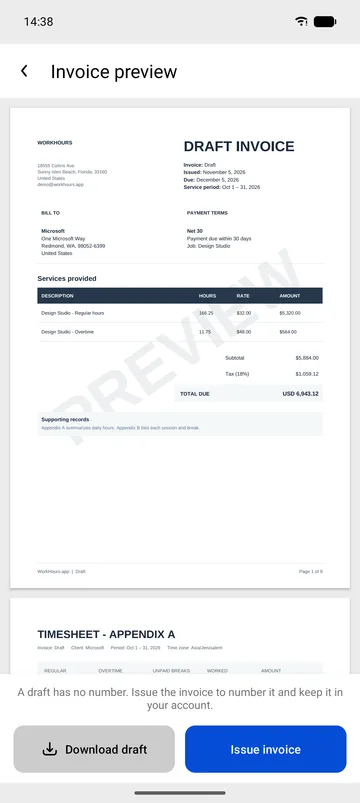
The preview shows the invoice exactly as your client will receive it. It carries your details and the client’s, the service period and the payment terms.
Services are listed with hours, rate and amount: regular hours at your rate and overtime at the rate your overtime multiplier gives. The subtotal, tax and total due follow.
- Regular and overtime lines
- Subtotal, tax and total due
- Download the draft or issue the invoice
A timesheet your client can check
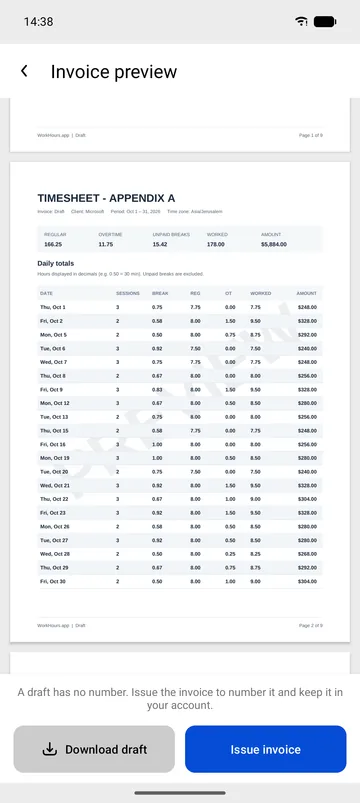
Behind the invoice, Appendix A lists every day in the period with worked hours, breaks and overtime. Clients who question a total can see where each hour came from.
Issuing the invoice gives it a number and keeps it in your account, so you can share the same PDF again later.
Your first invoice
- Set your hourly rate, currency and overtime rule on the job, then add the client’s details and your tax rate.
- Track your hours with the timer, or add sessions with Add Entry.
- Open Reports, choose the billing period and tap Export PDF.
- Choose Invoice + timesheet, set the issue and due dates, the tax rate and a note.
- Tap Preview, check the draft, then Issue invoice to number it and download the PDF.
Free vs Pro
You can set up and preview invoices for free to see exactly what your client will get. Downloading and issuing them is part of Pro.
| Feature | Free$0 | Pro$3.99 |
|---|---|---|
| Time tracking, breaks and tags | Included | Included |
| Hourly rate, currency and overtime rate | Included | Included |
| Invoice preview (draft) | Included | Included |
| Download draft invoice | Not included | Included |
| Issue numbered invoices | Not included | Included |
| Timesheet-only PDF | Not included | Included |
| CSV export for your accountant | Not included | Included |
| One job per client | 1 job | Included |
| Custom billing periods | Not included | Included |
Pro is $3.99 a month in the US and starts with a 7-day free trial. It is billed through the App Store or Google Play in your local currency, and you can cancel from your store account.
Download WorkHours free
On iPhone, iPad and Android. Start tracking in under a minute, no account needed.
Frequently asked questions
Is invoicing free in WorkHours?
Setting up and previewing an invoice is free. Downloading the draft and issuing numbered invoices is part of Pro, which costs $3.99 a month in the US and starts with a 7-day free trial.
Can I bill overtime at a higher rate?
Yes. Set a daily or weekly overtime threshold and a multiplier on the job. Hours past the threshold appear on their own invoice line at your rate times the multiplier.
Can I add tax or VAT to the invoice?
Yes. Save a tax rate on the job and adjust it per invoice on the Export PDF sheet. WorkHours adds the tax to the subtotal and shows the total due. Which rate applies to you depends on your country and registration, so check with your accountant.
Does the invoice show the hours behind the total?
Yes. Invoice + timesheet attaches Appendix A with every day, worked hours, breaks and overtime. Choose Timesheet only when someone needs the hours without an invoice.
Can I invoice in a currency other than US dollars?
Yes. Each job has its own currency, and the invoice uses the currency of the job you export.