

Free time tracking app
A free time tracker for iPhone and Android
WorkHours is free to download on iPhone, iPad and Android, and the free plan is a complete time tracker with no time limit: one-tap timers, a break timer, tags, weekly and monthly reports with earnings and overtime, a shift history you can edit, and clock-out reminders. There are no ads and you can start without an account. Pro, at $3.99 a month with a 7-day free trial, adds exports, invoices, custom date ranges and multiple jobs.
At a glance
- Free forever, with no time limit
- No ads, no account needed to start
- Works offline and syncs when you are back online
- Reports with earnings and overtime included
- iPhone, iPad and Android
What the free plan includes
A real timer, free
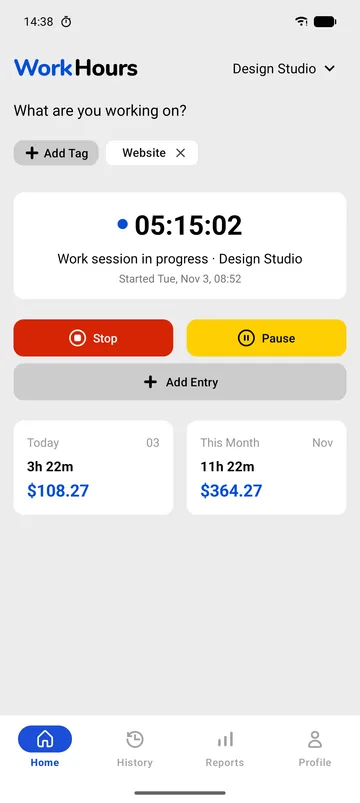
Start and stop with one tap, tag what you are working on, and pause for breaks. Home shows today’s and this month’s hours and earnings.
Forgot to start? Add Entry records a session afterwards, and History lets you correct any start or end time.
- One-tap timer and break timer
- Tags
- Add Entry and editable history
Reports that answer “how much did I work?”
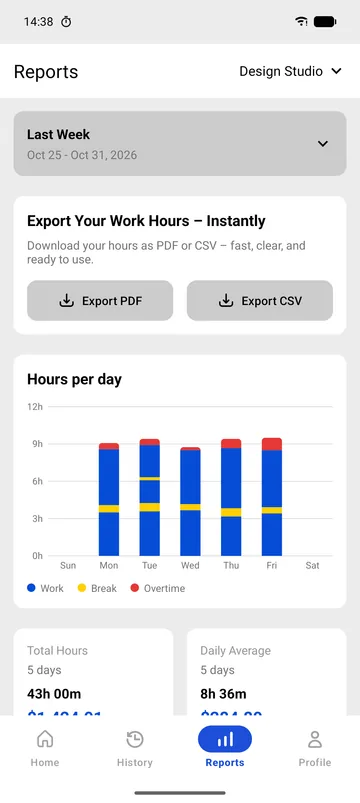
Reports shows this week, last week, this month or last month: hours per day with work, breaks and overtime, total hours, daily average and earnings.
Task breakdown splits the time by tag, so you see where the hours went as well as how many there were.
- Hours per day chart
- Totals, average and earnings
- Time per tag
Controls on the lock screen
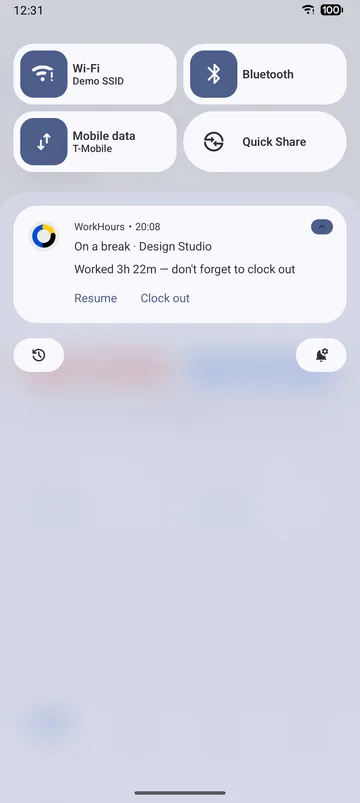
A running session appears on the iPhone lock screen as a Live Activity and in the Android notification. Pause, resume or clock out without unlocking the app, and get a reminder to clock out.
When Pro is worth it
- You send hours to someone else: Pro exports PDF timesheets and CSV files that open in Excel or Google Sheets.
- You bill clients: Pro downloads and issues numbered PDF invoices with a timesheet appendix.
- You work more than one job: Pro adds jobs with their own rates and runs two timers at once.
- Your pay period is unusual: Pro reports any custom date range.
- If none of these apply, the free plan covers you, with no time limit.
Free vs Pro
The complete comparison. Everything in the Free column stays free, with no trial clock.
| Feature | Free$0 | Pro$3.99 |
|---|---|---|
| One-tap time tracking | Included | Included |
| Break timer | Included | Included |
| Tags and Task breakdown | Included | Included |
| Weekly and monthly reports | Included | Included |
| Earnings and overtime | Included | Included |
| Shift history with editing | Included | Included |
| Clock-out reminders and lock-screen controls | Included | Included |
| Invoice preview | Included | Included |
| PDF timesheet and CSV export | Not included | Included |
| Download and issue PDF invoices | Not included | Included |
| Custom date range reports | Not included | Included |
| Multiple jobs with parallel timers | 1 job | Included |
| Priority support | Not included | Included |
Pro is $3.99 a month in the US and starts with a 7-day free trial. It is billed through the App Store or Google Play in your local currency, and you can cancel from your store account.
Download WorkHours free
On iPhone, iPad and Android. Start tracking in under a minute, no account needed.
Frequently asked questions
Is WorkHours really free?
Yes. The free plan has no time limit and includes time tracking, breaks, tags, weekly and monthly reports, history and reminders. Pro is optional.
Does the free version show ads?
No. WorkHours has no ads on any plan.
Do I need to create an account?
No. Open the app and start tracking. You only need an account with a verified email to subscribe to Pro.
What happens after the 7-day Pro trial?
If you keep Pro, it renews monthly through the App Store or Google Play. If you cancel during the trial, you go back to the free plan and keep all your tracked hours.
Does the free version work offline?
Yes. You can start and stop sessions without a connection, and they sync when you are back online.