

For people with more than one job
One time tracker for all your jobs
If you work more than one job, you need each job’s hours and pay kept apart, including the days your shifts overlap. WorkHours gives every job its own hourly rate, currency and overtime rule, lets you switch the active job in one tap, and can run two timers at the same time when you really are working for two clients at once.
At a glance
- A job per employer or client
- Own hourly rate, currency and overtime rule per job
- Switch jobs, or keep both timers running
- Reports and exports per job
- Separate invoices for each client
How WorkHours keeps jobs apart
Every job in one list
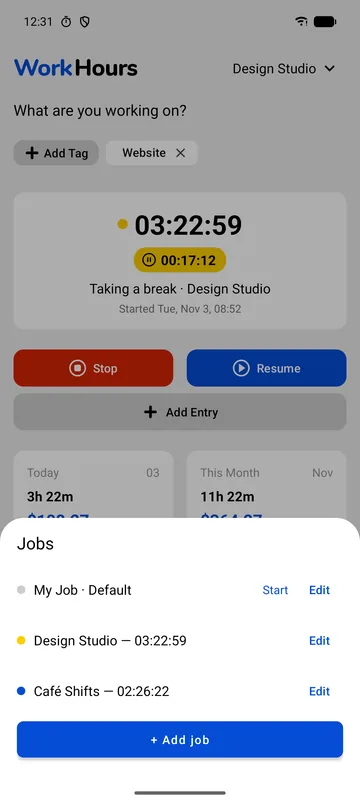
Open the job picker to see all your jobs and which ones are running. Here Design Studio has been going for 5 minutes and Café Shifts for 4.
Each job keeps its own settings: hourly rate, currency, overtime threshold and multiplier, and the client details used on invoices.
- Running time per job
- Edit or start any job from the list
- Add Job for a new employer or client
Switch jobs or start both
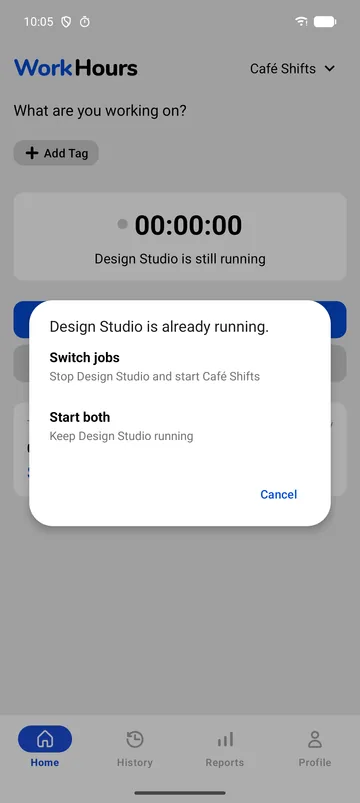
Start a second job while another is running and WorkHours asks what you mean. Switch jobs stops the first and starts the second, which is right when you leave the studio for the café.
Start both keeps the first timer running too, for the times you are on call for one client while working for another.
- Switch jobs: stop one, start the other
- Start both: two timers at once
Reports and invoices per job
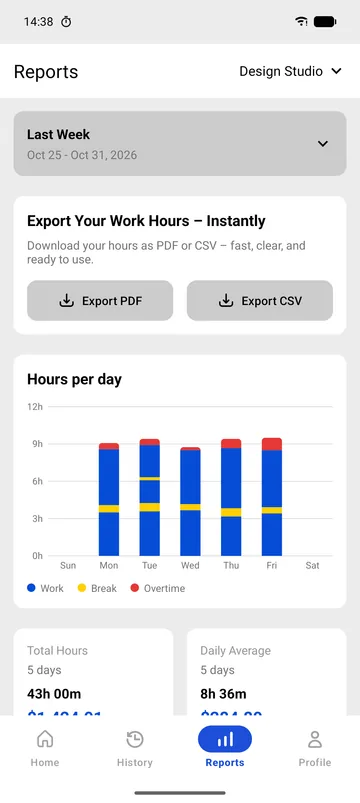
Pick a job at the top of Reports to see its hours per day, total hours, daily average and earnings in its own currency.
Exports follow the same job, so each employer gets their own timesheet and each client their own invoice.
Set up two jobs
- Download WorkHours. Your first job is ready; give it your main employer’s name, rate and currency.
- Start the 7-day Pro trial and tap Add Job for your second job.
- Give the second job its own rate, currency and overtime rule.
- Pick the job on the Home screen before you tap Start.
- When the jobs overlap, choose Switch jobs or Start both.
Example: two jobs, two sets of rules
Each job is calculated on its own, so a long week at one job never pushes the other into overtime.
| Setting | Design Studio | Café Shifts |
|---|---|---|
| Hourly rate | $32 | $15 |
| Currency | USD | USD |
| Overtime rule | Weekly, after 40 h | Daily, after 8 h |
| Overtime multiplier | 1.5× | 1.5× |
| Exports and invoices | Own timesheet and invoice | Own timesheet |
Free vs Pro
The free plan tracks one job completely. Multiple jobs and parallel timers are the heart of Pro.
| Feature | Free$0 | Pro$3.99 |
|---|---|---|
| Full time tracking for one job | Included | Included |
| Breaks, tags and history | Included | Included |
| Rate, currency and overtime rule | Included | Included |
| Additional jobs | Not included | Included |
| Two timers running at once | Not included | Included |
| Per-job PDF timesheets and CSV | Not included | Included |
| Per-client invoices | Not included | Included |
| Custom date ranges | Not included | Included |
Pro is $3.99 a month in the US and starts with a 7-day free trial. It is billed through the App Store or Google Play in your local currency, and you can cancel from your store account.
Download WorkHours free
On iPhone, iPad and Android. Start tracking in under a minute, no account needed.
Frequently asked questions
How many jobs can I track for free?
The free plan includes one job with full tracking, breaks, tags, reports and history. Pro lets you add more jobs and run their timers in parallel.
Can two timers run at the same time?
Yes, with Pro. When you start a second job, choose Start both and the two timers run side by side, each counting toward its own job.
Can each job use a different currency?
Yes. Rate, currency and overtime rule are set per job, and reports, timesheets and invoices use the job’s own currency.
Is overtime calculated across all my jobs?
No, each job has its own overtime rule and its own count. Forty hours at the studio and ten at the café give overtime only where that job’s rule says so.