

Overtime tracking
Track your overtime hours automatically
To track overtime you need a clear rule, hours per day or hours per week, and every minute past it counted and paid at the right rate. In WorkHours you set that rule once per job: overtime after 8 hours a day or 40 hours a week by default, with your own multiplier such as 1.5×. The app then marks overtime in your reports, adds it to your pay, and puts it on its own line in timesheets and invoices.
At a glance
- Daily or weekly overtime threshold, per job
- Your own overtime multiplier, such as 1.5× or 2×
- Overtime in red on the hours-per-day chart
- Overtime pay included in your earnings
- Overtime columns in timesheets, CSV and invoices
How WorkHours counts overtime
See overtime the day it happens
Set the rule on your job: overtime after a number of hours per day, or per week. WorkHours starts at 8 hours a day or 40 hours a week, and you change both the threshold and the multiplier to match your contract.
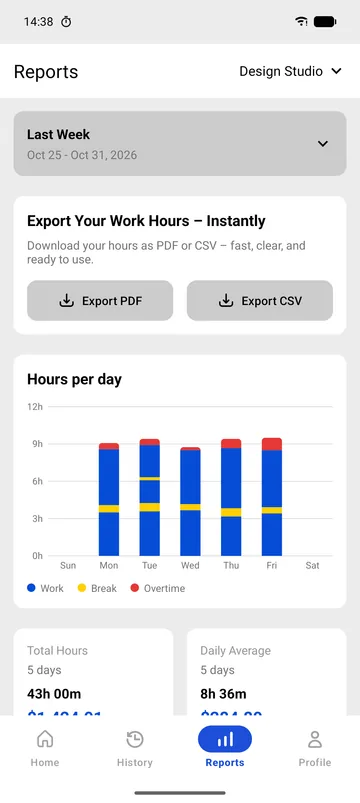
In Reports, the hours-per-day chart stacks work in blue, breaks in yellow and overtime in red. A long Thursday stands out at a glance.
- Daily or weekly threshold
- Multiplier per job
- Work, break and overtime on one chart
Overtime on paper, line by line
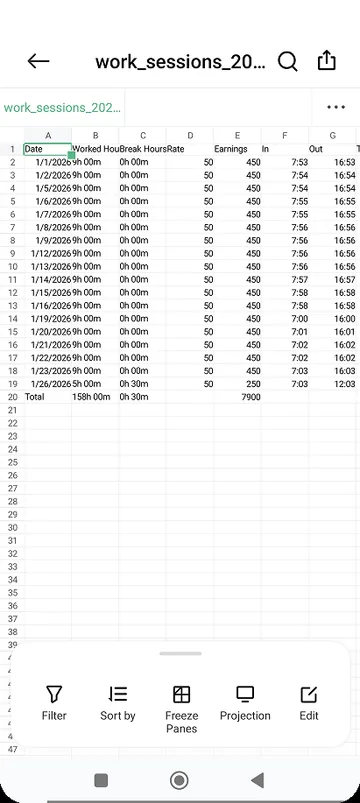
Exports keep overtime visible. The CSV has overtime columns next to worked hours and breaks, and the PDF timesheet lists overtime for every day.
On an invoice, overtime hours get their own line at your rate times the multiplier, so the higher rate is clear to whoever pays it.
- Overtime columns in CSV
- Overtime per day in the PDF timesheet
- Separate overtime line on invoices
Set up overtime tracking
- Open your job and enter your hourly rate.
- Turn on overtime and choose a daily or a weekly threshold.
- Enter the threshold, for example 8 hours a day or 40 hours a week.
- Enter the multiplier your contract pays, for example 1.5.
- Track as usual. Overtime appears in Reports, in your earnings and in every export.
Daily or weekly overtime: the same week, two results
Which rule you pick changes the result. Here is one week of 42 worked hours at $20 an hour with a 1.5× multiplier, counted both ways.
| Day | Hours worked | Overtime, daily 8 h rule | Overtime, weekly 40 h rule |
|---|---|---|---|
| Monday | 9 h | 1 h | – |
| Tuesday | 10 h | 2 h | – |
| Wednesday | 8 h | 0 h | – |
| Thursday | 9 h | 1 h | – |
| Friday | 6 h | 0 h | 2 h |
| Week | 42 h | 4 h · $880 total pay | 2 h · $860 total pay |
Daily rule: 38 regular hours × $20 = $760, plus 4 overtime hours × $30 = $120. Weekly rule: 40 × $20 = $800, plus 2 × $30 = $60. Under the weekly rule, overtime starts once the week passes 40 hours, which here happens on Friday.
Free vs Pro
Overtime tracking works on the free plan for your job. Pro adds exports with overtime columns, and separate jobs with their own overtime rules.
| Feature | Free$0 | Pro$3.99 |
|---|---|---|
| Daily or weekly overtime rule | Included | Included |
| Overtime multiplier | Included | Included |
| Overtime on the reports chart | Included | Included |
| Overtime pay in your earnings | Included | Included |
| Overtime line in the invoice preview | Included | Included |
| Different overtime rules per job | 1 job | Included |
| PDF timesheet and CSV with overtime | Not included | Included |
| Download and issue invoices | Not included | Included |
| Custom date ranges | Not included | Included |
Pro is $3.99 a month in the US and starts with a 7-day free trial. It is billed through the App Store or Google Play in your local currency, and you can cancel from your store account.
Download WorkHours free
On iPhone, iPad and Android. Start tracking in under a minute, no account needed.
Frequently asked questions
Should I use a daily or a weekly overtime rule?
Use the rule in your contract or local law. In the US, federal law generally pays non-exempt employees overtime for hours over 40 in a workweek, and some states, such as California, add a daily rule after 8 hours. Many contracts elsewhere use a daily limit. WorkHours supports either, per job.
Do breaks count toward overtime?
No. Breaks run on their own timer and stay out of your worked hours, so only working time counts toward the overtime threshold.
Can some shifts pay double time?
WorkHours applies one multiplier per job. If weekend or holiday shifts pay 2×, set them up as a separate job with a 2× multiplier so their hours stay apart. Extra jobs are part of Pro.
Can I check overtime for last month?
Yes. Reports covers this week, last week, this month and last month on the free plan. Custom ranges, such as a pay period from the 16th to the 15th, are part of Pro.