

For employees and shift workers
A simple app to track your work hours
If you are paid by the hour, the simplest way to track your work hours is to tap once when you start, pause for breaks and tap again when you leave. WorkHours keeps that record on your phone, keeps breaks apart from work time, and shows today’s hours and pay, so you can check every payslip against your own numbers.
At a glance
- Clock in and out with one tap
- Breaks on their own timer, never counted as work
- Pause, resume or clock out from the notification or lock screen
- Every shift in History, with times you can correct
- Weekly and monthly totals with your pay
Built for clocking in and out
Breaks that stay out of your hours
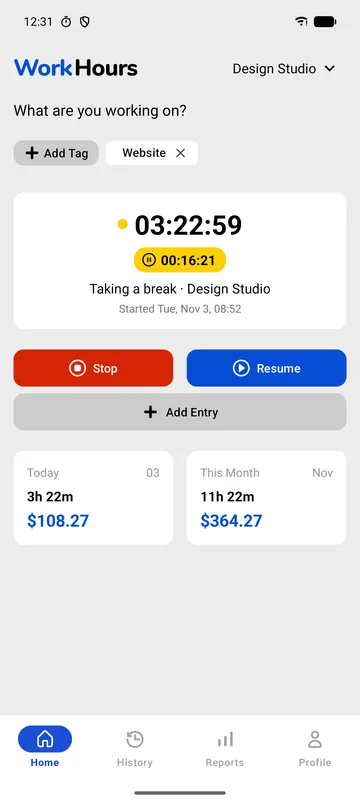
Tap Pause when you go on lunch. The work timer stops, a yellow break timer starts, and Home shows the session as “Taking a break”. Tap Resume when you are back.
Your worked hours and pay only count working time, so a 30-minute unpaid lunch never inflates the day.
- Separate break timer
- Today and this month in hours and money
- Add Entry for a shift you missed
Clock out without opening the app
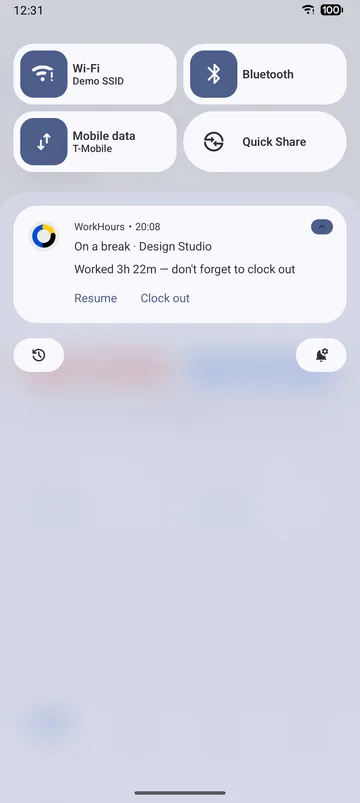
While a shift is running, WorkHours shows it on your iPhone lock screen as a Live Activity and in the Android notification shade. Resume or Clock out straight from there.
A reminder in the notification nudges you to clock out, so a forgotten timer does not run through the night.
- iPhone Live Activity with Resume and Clock out
- Android notification with Pause, Resume and Clock out
Every shift, ready to compare with your payslip
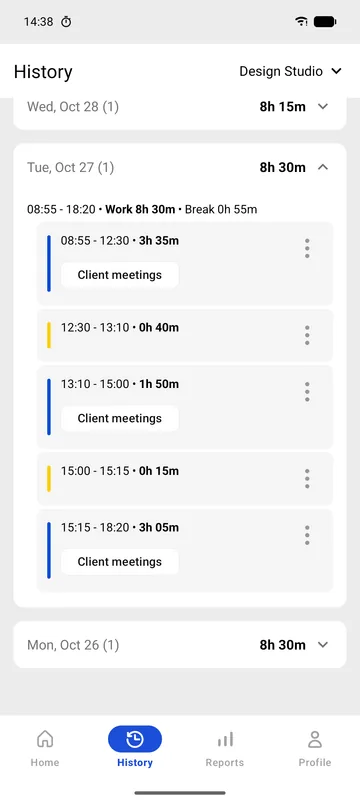
History lists each day with its work and break segments and their start and end times. If you clocked in late or forgot to stop, edit the time and the totals update.
When payday comes, the weekly and monthly totals in Reports tell you what you should see on your payslip.
- Work and break segments per day
- Edit start and end times
- Hours per week and per month
How to track your shifts
- Download WorkHours and enter your hourly rate, so the app can show your pay.
- If your contract pays overtime, set the daily or weekly limit and the multiplier.
- Tap Start when your shift begins.
- Tap Pause for breaks and Resume when you are back, from the app or the notification.
- Clock out at the end of the shift and check your week in Reports.
Free vs Pro
Tracking your own shifts is free, with no limit on how many you track. Pro is for when you need to hand a timesheet to your manager or track a second job.
| Feature | Free$0 | Pro$3.99 |
|---|---|---|
| Clock in and out with one tap | Included | Included |
| Break timer | Included | Included |
| Lock screen and notification controls | Included | Included |
| Clock-out reminders | Included | Included |
| Shift history with editable times | Included | Included |
| Weekly and monthly totals with pay | Included | Included |
| Overtime rule and overtime pay | Included | Included |
| PDF timesheet or CSV for your manager | Not included | Included |
| Custom pay periods, e.g. the 1st to the 15th | Not included | Included |
| A second job | Not included | Included |
Pro is $3.99 a month in the US and starts with a 7-day free trial. It is billed through the App Store or Google Play in your local currency, and you can cancel from your store account.
Download WorkHours free
On iPhone, iPad and Android. Start tracking in under a minute, no account needed.
Frequently asked questions
Is WorkHours free for tracking my shifts?
Yes. Clocking in and out, breaks, reminders, history and weekly and monthly reports are all on the free plan. There are no ads.
Does break time count as work time?
No. Breaks run on their own timer and are kept out of your worked hours and pay. Your timesheet still lists them, so you can show you took them.
What if I forget to clock out?
WorkHours reminds you in the notification while a shift is running. If a timer still runs too long, open History and set the real end time; your totals update straight away.
Can I send my hours to my manager?
Yes, with Pro. Export a PDF timesheet with every day, break and overtime hour, or a CSV that opens in Excel or Google Sheets.
Does it work without an internet connection?
Yes. You can clock in and out with no signal, for example in a warehouse or on a site, and your sessions sync when you are back online.